Revenue analytics, explained · built on Stripe
Your Stripe revenue — measured, explained, and recovered.
Recensa reads your Stripe account and turns it into accurate metrics, plain-English explanations of what moved and why, and ready-to-send emails that win back failed and expiring payments before they become churn.
Analytics
MRR, churn & retention, recomputed from source.
Explained
Every number comes with a plain-English why.
Recovery
Failed & expiring payments, won back before they churn.
- Connects to Stripe in one click
- Read-only access
- No card to start
Monthly recurring revenue
$14,280
- New business
- +$820
- Expansion
- +$340
- Reactivation
- +$0
- Contraction
- −$110
- Churned
- −$95
Failed charges won back before they churned
Why it moved: Growth led by new business and expansion, with churn held under 1%. Recovery won back $610 in payments that would otherwise have been lost.
The principle
If the number isn’t true, the story doesn’t matter.
Every figure Recensa shows is computed directly from your raw Stripe data — never estimated, never rounded for effect. The explanations are written from those exact numbers, so the words always match the math. You can hand a Recensa report to an investor without double-checking it first.
What you get
Four questions, answered the moment you log in.
Recensa is built around the order founders actually think in: what is my revenue, why did it change, am I keeping it, and can I get back what slipped.
Overview
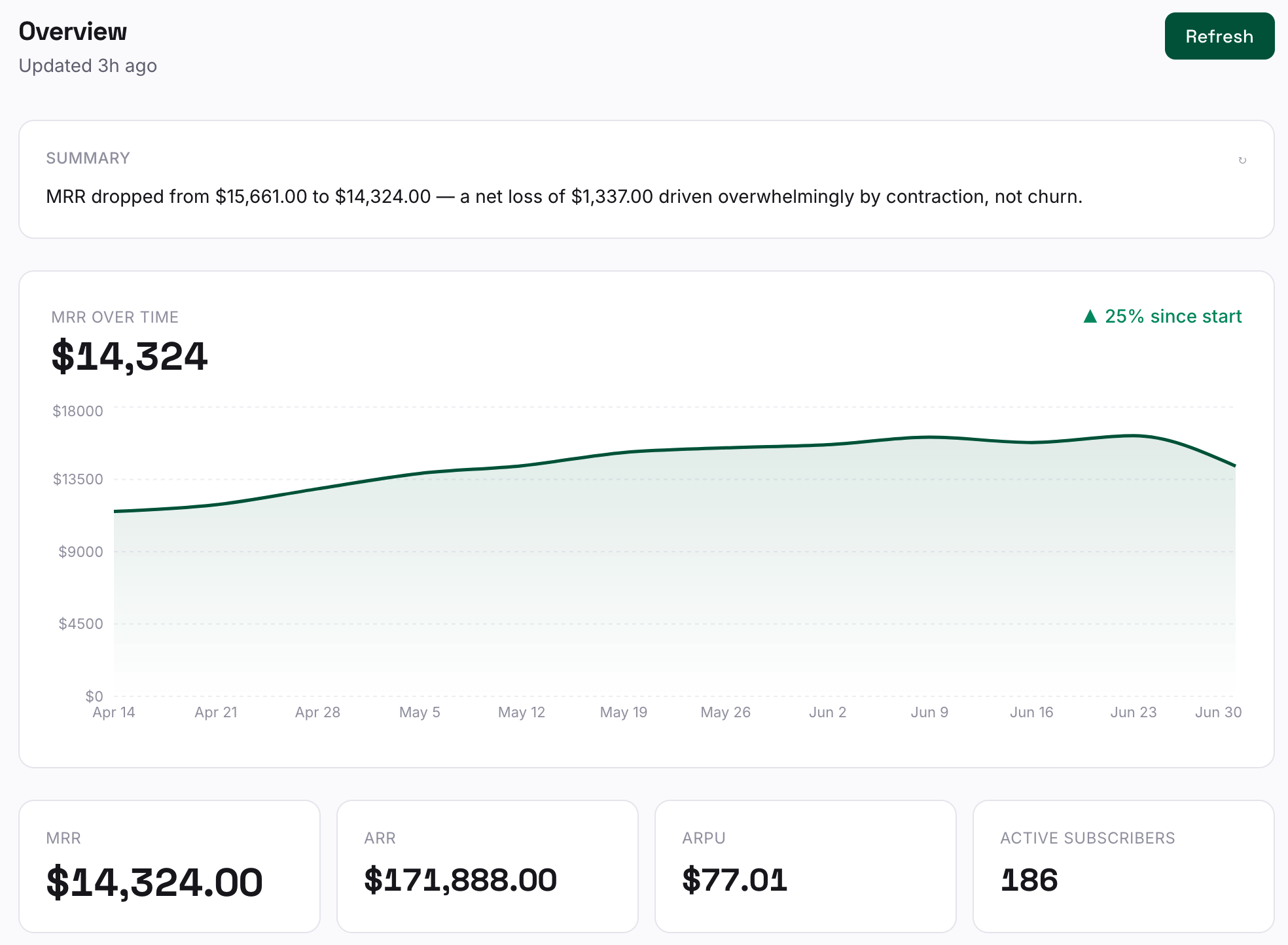
Revenue metrics that reconcile
MRR, ARR, ARPU, active subscribers, and a clean plan breakdown — recomputed from your Stripe account, not pieced together from exports. A trend line shows where you've been, and a short written summary tells you what the figures mean this period.
- MRR / ARR / ARPU at a glance
- Plan-by-plan revenue split
- Trend history with a written summary
Movement
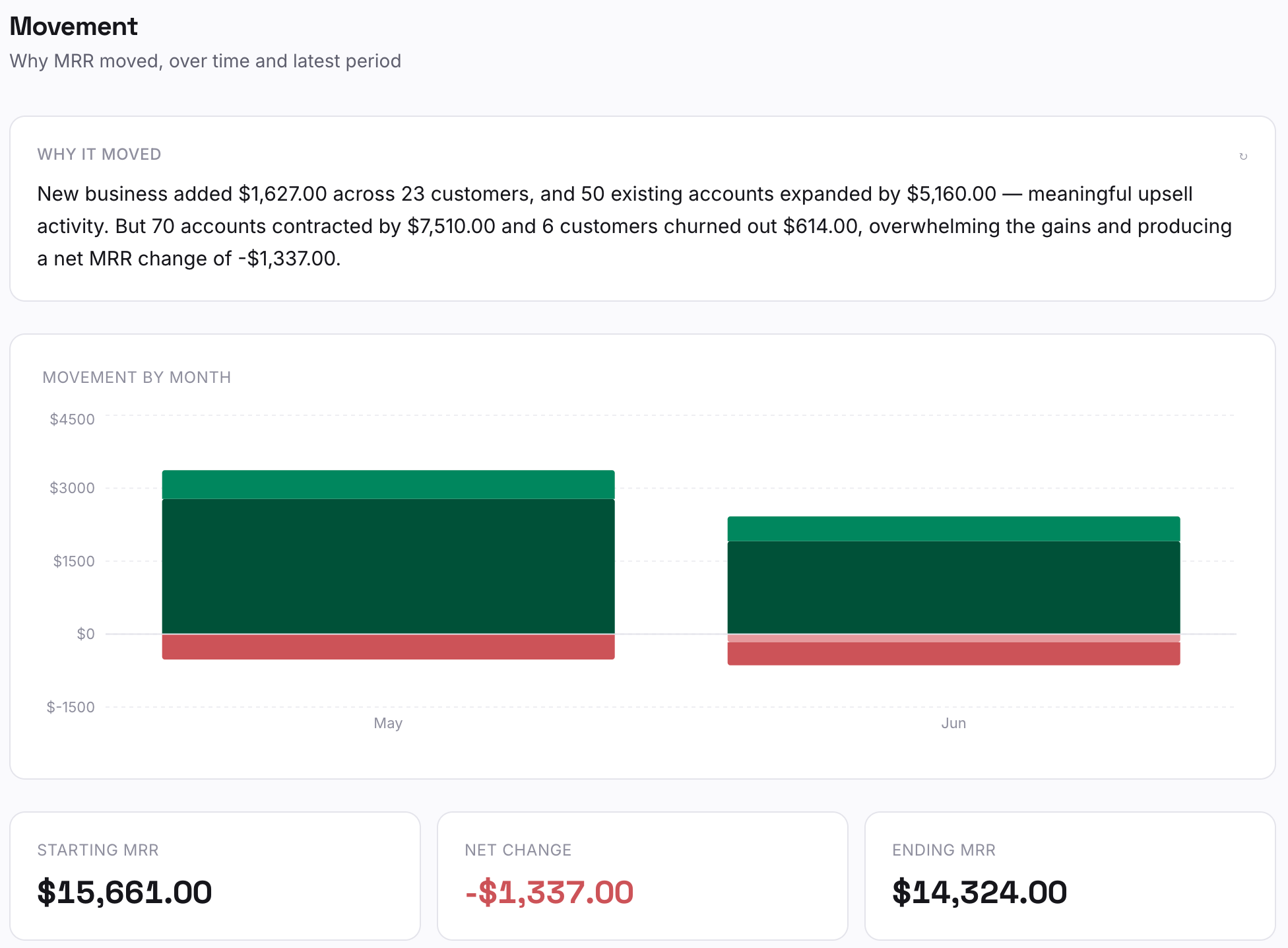
See why revenue moved
New business, expansion, contraction, churn, and reactivation — broken out and reconciled so the five categories always add up to the change in your MRR. A waterfall makes the swing obvious, and a plain-English note names what drove it.
- Five-part movement waterfall
- Categories reconcile to the exact delta
- Named accounts behind each change
Churn & retention
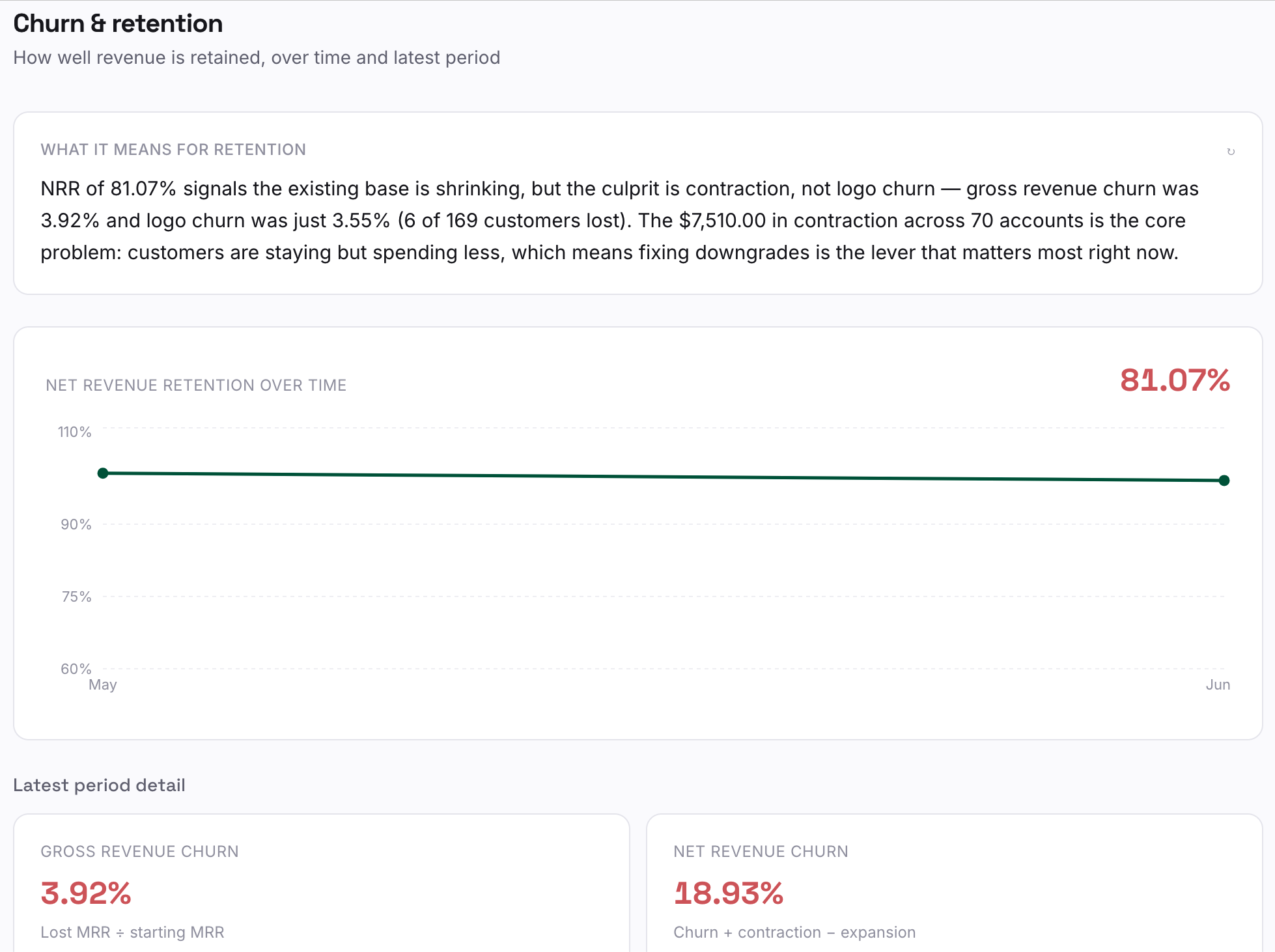
Keep the revenue you have
Gross and net churn, NRR, GRR, and logo churn — plus a named list of the accounts that cost you revenue this period, so retention stops being an abstract percentage and becomes a list you can act on.
- NRR, GRR, gross & logo churn
- “Who lost you revenue” by account
- Retention summary in clear language
Recovery
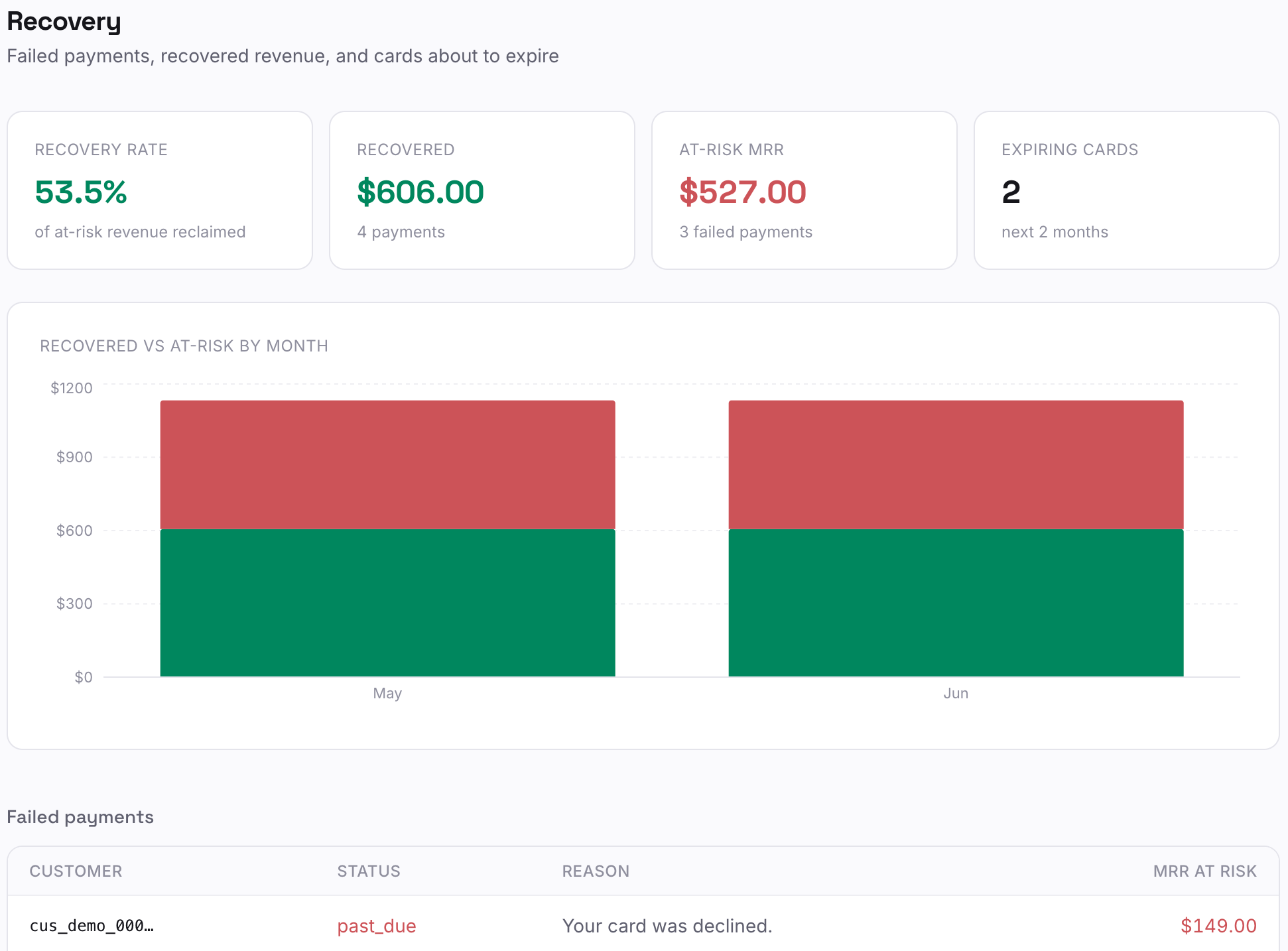
Recover payments before they become churn
Recensa flags failed charges and cards about to expire, tracks what's already been recovered, and drafts a recovery email tuned to each situation — gentle for an expired card, firmer after repeated failures. You review and send.
- Failed, recovered & expiring, separated
- Recovery rate tracked over time
- Ready-to-send recovery emails per account
Weekly briefing
A short note on your business, in your inbox.
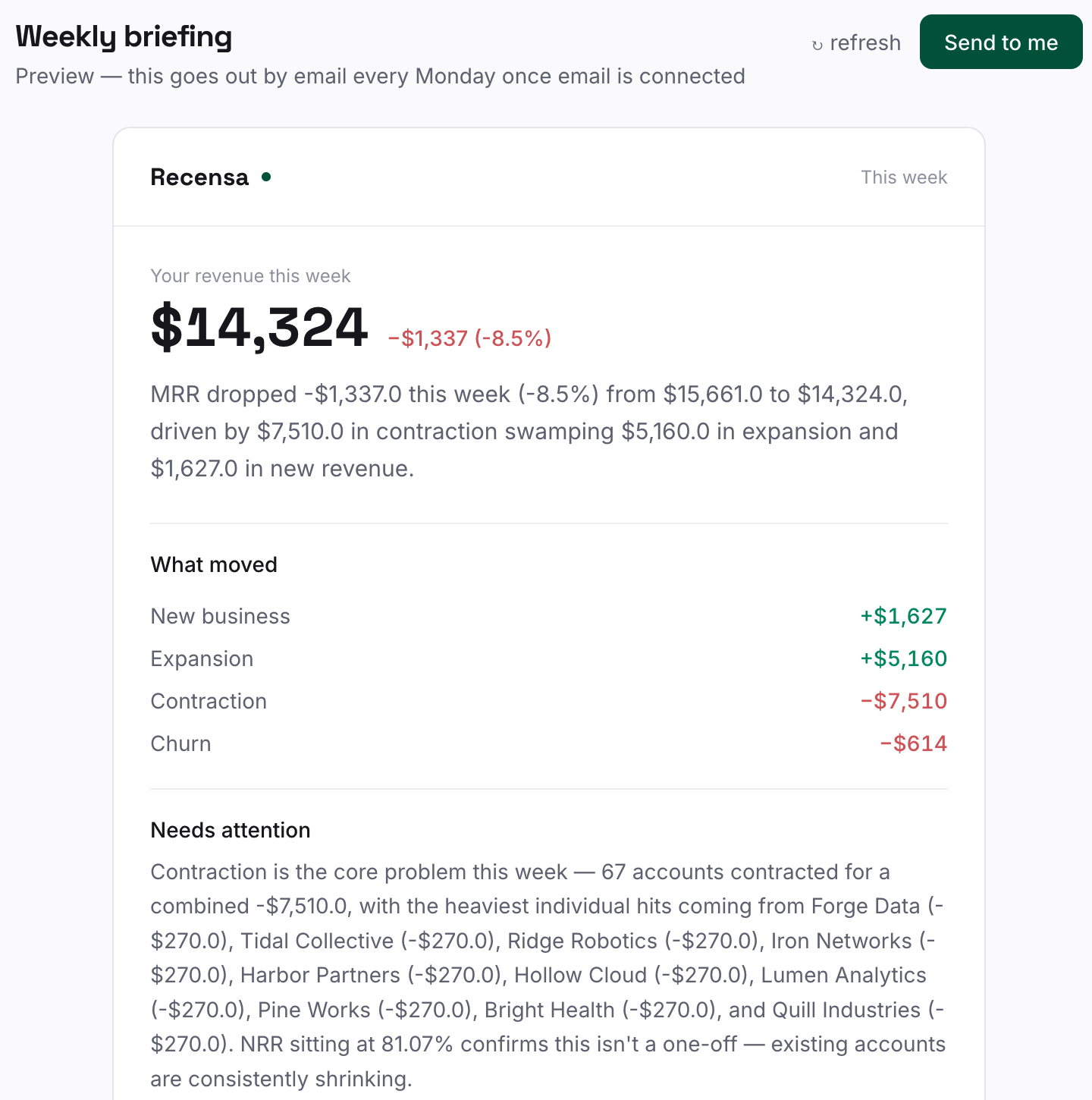
Once a week, Recensa sends a briefing written from your actual numbers: what to read, what needs attention, and what to act on. No dashboard to open — it reads like a note from a finance lead who already did the homework.
- Figures pulled live from Stripe, then explained
- Read · Attention · Action, in that order
- Preview every briefing before it sends
How it works
Connected in a minute. Useful immediately.
Connect Stripe
Authorize Recensa with read-only access. It never moves money or changes anything in your account — it only reads.
Recensa computes
Your raw Stripe data is turned into reconciled metrics, movement, churn, and recovery — recalculated, not estimated.
You read the story
Open the dashboard or wait for the weekly briefing. The numbers come with plain-English explanations attached.
Pricing
Start with the numbers. Upgrade to win revenue back.
Starter gives you the full analytics suite — metrics, movement, churn, cohorts and lifetime value. Pro adds automated payment recovery and a weekly briefing that pays for itself. Try Starter free for 14 days; no card required.
Starter
Know exactly what your revenue is doing.
$39/mo
- MRR, ARR, ARPU & plan breakdown
- Movement — what moved and why
- Churn, retention & NRR
- Cohort retention & lifetime value
14 days free · no card required
Pro
Most popularWin back the revenue you're losing.
$99/mo
- Everything in Starter
- Automated payment recovery
- Failed-payment & expiring-card tracking
- Weekly briefing to your inbox
- Priority support
Stop guessing what your Stripe data means.
Connect your account and get reconciled metrics with clear explanations in minutes.
Start your 14-day trialContact
Questions? Get in touch.
Tell us what you’re after and we’ll get back to you.